
Manage Children’s Wisconsin Notifications
Sign-up for Text Messages
- Log in to MyChart at mychart.childrenswi.org or from the Children’s Wisconsin mobile app.
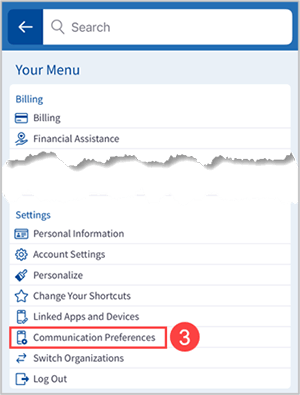
- Select Menu
 .
. - Select Communication Preferences at the bottom of the Menu.
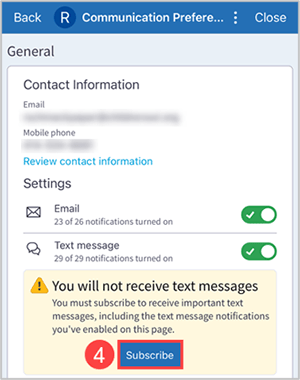
- If your mobile phone number has not been verified, select Verify under the Text message section.
- Under the Text message section, select Subscribe.
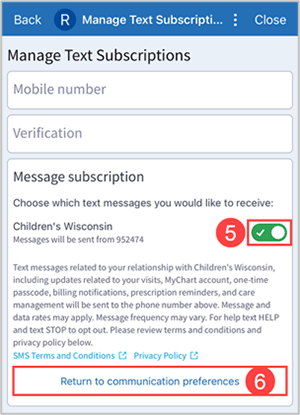
- In the Message subscription section, slide toggle button to On.
- Click Return to communication preferences. You will receive a text message confirming that you have signed up for text messages.
Note: You can also sign-up for Text Messages by texting “START” to 952474 on your mobile phone.
Change Your Notification Settings
- Select Menu.
- Select Communication Preferences.
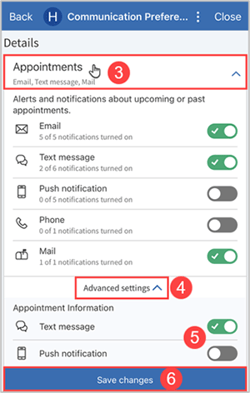
- Select a section, such as Appointments, to see more options.
- If you turn off a main contact method, such as Email, it will be turned off for all messages in that section.
- Select Advanced settings.
- Turn specific notifications on or off, such as Appointment Information, here.
- Select Save changes.
Note: Changes made to your own MyChart account will affect all accounts you can access.
- To change notification settings for a specific child, switch to that child’s account and access Communication Preferences there. Any changes will be for that child’s account only
Communication Preferences Key
See the different notification types below to help you decide if you want to opt in or out of those notifications. Select Advanced settings to turn on / off specific notifications.
Items with a  means you are unable to turn off that notification.
Notification Type |
What Is the Notification For? |
| Appointments |
Alerts and notifications about upcoming or past appointments.
|
| Messages |
Notifications for new MyChart messages from your provider or care
|
| Health |
Notifications when new information is available about your care.
|
| Billing |
Notification updates about billing information.
|
| Questionnaires |
Notifications when questionnaires are available or due.
|
| Account Management |
Notifications about account updates.
|
| Telehealth |
Notifications around current telehealth (virtual) visits.
|
Draft Number: Revision Date: September 21, 2026
This content was created to help you care for your child and/or family member. It does not take the place of medical care. Talk with your healthcare provider for diagnosis, treatment and follow-up.